[email protected]
 0,00 0

Cart

No products in the cart.

WooCommerce Plugin

Sell Made-to-Measure Selling Window Blinds & Curtains Online

Transform your WooCommerce store into a professional blinds retail operation. From instant dimension-based pricing to automated supplier fulfillment and complete production management - SWB handles the complexity so you can focus on growing your business.

Built for professional blind retailers worldwide

  • WooCommerce HPOS Compatible
  • WordPress 5.8+ Ready
  • PHP 7.4+ / PHP 8.x
  • Enterprise Security
THE CHALLENGE
Selling Made-to-Measure Blinds Online is Complex
Infinite dimension combinations make manual pricing impossible
Child safety regulations vary by country and product type
Manually sending orders to suppliers wastes hours daily
Tracking production status across multiple suppliers is chaotic
Fabric cutting waste eats into profit margins
THE SOLUTION
SWB Automates Your Entire Operation
Price grids calculate any dimension combination instantly
Child safety rules auto-apply based on region and product
Orders auto-export to suppliers via FTP, webhook, or email
Supplier status updates sync back to WooCommerce automatically
Fabric optimizer algorithm minimizes cutting waste
Product Support
Built for All Blind Types
SWB works with any made-to-measure window covering product
Roller Blinds
Chain controls, spring mechanisms, motorized options with fabric selection
Vertical Blinds
Louvre width options, headrail configurations, fabric ranges
Venetian Blinds
Aluminium, wood, faux wood with slat size and colour options
Curtain Blinds
Fabric selection, lining options, mounting configurations
Panel Blinds
Panel count, track systems, fabric coordination
Pleated Blinds
Perfect fit, conservatory, skylight with pleat size options
Features
Everything You Need to Sell Blinds Online
From instant pricing to production management, SWB handles the complexity so you can focus on growing your business.
Price Grids
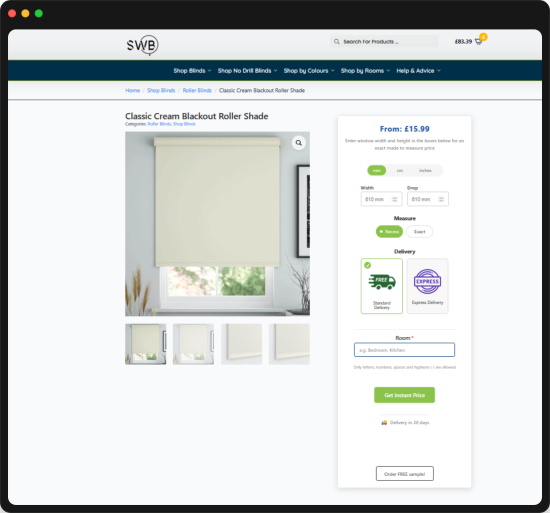
Visual spreadsheet-style editor for dimension-based pricing. Customers enter width and drop, the system calculates price instantly from your predefined grids.
Visual Grid Editor
Spreadsheet-style interface with drag-to-fill, undo/redo (Ctrl+Z/Y), copy/paste (Ctrl+C/V), and keyboard navigation
Import/Export
CSV format with dimension headers, JSON backup, duplicate grids, and bulk operations
Smart Calculation
Automatic rounding to nearest grid size, unit conversion (mm, cm, inches), real-time updates
Lead Times
Set different manufacturing lead times per grid for accurate delivery estimates
Discount Management
Percentage-based discounts with toggleable activation per product or category
Product Configurator
Create unlimited parameters and options to build complex product configurations your customers can customize.
Parameter Types
Dropdown menus, text inputs, number fields, checkboxes - each with display names and ordering control
Option Pricing
Fixed price adjustments or grid-based pricing per option with discountable flags
Visual Selection
Add images to parameters and options with custom sizes for visual product building
Conditional Logic
Show/hide options based on other selections with dependent option chains
Product Codes
Internal identifiers (VER, ROL, PF) for supplier routing and inventory management
Stock Items & Fabric Management
Complete fabric inventory with roll dimensions for cutting optimization.
Stock code & supplier code mapping
Fabric range & colour organization
Roll length & width dimensions (mm)
Turn fabric toggle for 90° rotation
Main image, gallery & sample images
Category and product code assignment
Active/inactive status control
Child Safety Rules
Automatic chain length calculation for regulatory compliance across regions.
UK, Ireland, US, Australia, EU rules
Priority-based rule evaluation
Min/max dimension range targeting
Custom formulas (e.g., Drop - 200mm)
Mathematical functions support
Auto-applied to orders & exports
Per-product child safety flags
UI Designer
Styling options to customize your frontend without code.
Container: background, border, shadow, radius
Price: position, prefix, font, colours
Unit selector: pill, radio, dropdown styles
Inputs: modern, classic, minimal styles
Options: pill, button, card, grid layouts
Buttons: colours, shadows, full customization
WordPress colour picker integration
Bulk Assignment
Assign price grids to hundreds of products simultaneously.
Multi-product selection interface
Tabbed config: Grids, Stock Items, Products
Category-based checkbox selection
Auto-determine grids from mappings
Progress tracking during assignment
Bulk actions in WooCommerce Products
Product Formulas
Custom calculation formulas for pricing and metadata.
Variables: Width, Drop, Qty
Operators: +, -, *, /
Functions: Round, Floor, Ceiling, Case
MIN(), MAX() for comparisons
Number or text output types
Apply to products, options, or both
Formula builder with syntax highlighting
Order Export System
Automated supplier order delivery with multiple formats and complete tracking.
Multiple Suppliers
Configure unlimited suppliers with category or product code routing for automatic order distribution
Export Formats
CSV (tabular), XML/EDI (structured), or Webhook (HTTP POST) - match each supplier's requirements
FTP Automation
Auto-upload to supplier FTP folders with passive mode, acknowledgement folder monitoring
Export Logs
Complete audit trail with success/failure status, timestamps, error messages, and resend capability
Order Metadata
All parameters, options, dimensions, child safety calcs, formula results, and remake flags included
Supplier Status Sync
Bidirectional communication with your manufacturers.
Custom statuses: Cutting, Assembly, QC
Shipped by Supplier, Delivered stages
Webhook receiver for supplier updates
Auto-update WooCommerce order status
Real-time manufacturing visibility
Customer sees production progress
Remake Orders
Handle defects and errors with linked remake tracking.
Copy original order (217 → 217-1)
Modify dimensions, fabric, options
Record reason for remake
IsRemake_="True" in exports
Price set to zero for supplier
Link to original for tracking
Optional new WC order creation
Analytics Dashboard
Business intelligence to understand what sells and optimize your product range.
Key Metrics
Total orders, revenue, items sold, average order value, average per blind, samples ordered
Sales by Product Code
VER, ROL, PF breakdown with items sold, revenue, and averages per product type
Sales by Fabric
Stock code, range name, colour analysis showing what fabrics generate most revenue
Dimension Analytics
Heat map of popular width/drop combinations to optimize your price grid coverage
Date Filtering
All parameters, options,  Today, last 7 days, last 30 days quick filters plus custom date range picker , child safety calcs, formula results, and remake flags included
Work Sheet - Production Management
Complete internal workflow tracking from order receipt to delivery.
Order & Blinds Views
Toggle between order-level and item-level tracking with filtering and sorting
Custom Statuses
Create statuses like "Order Entered", "Order Printed", "In Production" with colour coding
Tags System
Organize with custom colour tags, mass tagging operations, filter by tag
Manufacturing Dates
Track manufacturing dates per order and item with full history of all changes
Audit Trail
Complete history log of all status changes, tag assignments, and modifications
Label Designer
Drag-and-drop label builder for production printing.
Visual grid-based layout editor
Drag-and-drop field placement
Resizable field elements
30+ data fields (customer, order, item)
Multiple template support
A4, A5 paper sizes
Portrait/landscape orientation
PDF export for printing
Fabric Optimizer
Intelligent cutting algorithm to minimize fabric waste.
First Fit Decreasing (FFD) algorithm
Turn fabric support (90° rotation)
Quantity expansion (qty=3 → 3 pieces)
Fabric grouping by code & colour
Visual layout with hover details
Blue (normal) / Orange (turned) coding
Waste & efficiency % calculation
PDF cutting sheet export
How It Works
From Customer Order to Delivery
SWB automates your entire blinds business workflow end-to-end
Customer Configures Online
Your customer visits your WooCommerce store and uses the SWB configurator:
Enters custom width and drop dimensions
Selects unit preference (mm, cm, inches)
Chooses fabric from your stock items with images
Picks control side, mounting type, and other options
Price calculates instantly from your price grids
Adds configured blind to cart
Customer View
Width: 1200mm
Drop: 1800mm
Fabric: Solar White
Price: £127.50
Order Placed & Processed
When checkout completes, SWB captures and processes everything:
All configuration data stored with the WooCommerce order
Child safety rules automatically evaluated and applied
Chain length calculations added to order metadata
Formula results computed and stored
Order appears in your admin dashboard and Work Sheet
Order #1234
Customer: John Smith
Item: Roller Blind
Chain Length: 1600mm
Status: Processing
Automatic Supplier Export
Order data is automatically sent to the correct supplier:
System identifies supplier based on product code or category
Generates export file in supplier's required format (CSV, XML, or webhook)
Uploads via FTP to supplier's order folder automatically
Generates order acknowledgement file
Export logged with timestamp and status
Failed exports can be resent with one click
Export Log
Supplier: Acme Blinds
Format: XML/EDI
FTP: orders.acme.com
Status: Sent
Production Tracking
Track manufacturing progress internally and from supplier updates:
Supplier posts status updates via webhook (Cutting, Assembly, QC)
WooCommerce order status updates automatically
Work Sheet shows all orders with custom statuses and tags
Generate cutting sheets using Fabric Optimizer
Print labels using the drag-and-drop Label Designer
Full audit trail of all changes
Work Sheet
Order #1234
Status: In Production
Tags: Urgent, Express
Mfg Date: Jan 15
Delivery & Analytics
Complete the cycle and learn from your data:
Order marked as shipped, tracking info sent to customer
Customer receives their made-to-measure blinds
Analytics dashboard shows what sold best
Dimension heat maps reveal popular sizes
Revenue by fabric helps optimize your range
Export data for external business analysis
Analytics
Top Fabric: Solar White
Popular Size: 1200x1800
Avg Order: £285
Revenue: £12,450
How It Works
From Customer Order to Delivery
SWB automates your entire blinds business workflow end-to-end
Customer Configures Online
Your customer visits your WooCommerce store and uses the SWB configurator:
Enters custom width and drop dimensions
Selects unit preference (mm, cm, inches)
Chooses fabric from your stock items with images
Picks control side, mounting type, and other options
Price calculates instantly from your price grids
Adds configured blind to cart
Customer View
Width: 1200mm
Drop: 1800mm
Fabric: Solar White
Price: £127.50
Order #1234
Customer: John Smith
Item: Roller Blind
Chain Length: 1600mm
Status: Processing
Order Placed & Processed
When checkout completes, SWB captures and processes everything:
All configuration data stored with the WooCommerce order
Child safety rules automatically evaluated and applied
Chain length calculations added to order metadata
Formula results computed and stored
Order appears in your admin dashboard and Work Sheet
Automatic Supplier Export
Order data is automatically sent to the correct supplier:
System identifies supplier based on product code or category
Generates export file in supplier's required format (CSV, XML, or webhook)
Uploads via FTP to supplier's order folder automatically
Generates order acknowledgement file
Export logged with timestamp and status
Failed exports can be resent with one click
Export Log
Supplier: Acme Blinds
Format: XML/EDI
FTP: orders.acme.com
Status: Sent
Work Sheet
Order #1234
Status: In Production
Tags: Urgent, Express
Mfg Date: Jan 15
Production Tracking
Track manufacturing progress internally and from supplier updates:
Supplier posts status updates via webhook (Cutting, Assembly, QC)
WooCommerce order status updates automatically
Work Sheet shows all orders with custom statuses and tags
Generate cutting sheets using Fabric Optimizer
Print labels using the drag-and-drop Label Designer
Full audit trail of all changes
Delivery & Analytics
Complete the cycle and learn from your data:
Order marked as shipped, tracking info sent to customer
Customer receives their made-to-measure blinds
Analytics dashboard shows what sold best
Dimension heat maps reveal popular sizes
Revenue by fabric helps optimize your range
Export data for external business analysis
Analytics
Top Fabric: Solar White
Popular Size: 1200x1800
Avg Order: £285
Revenue: £12,450
Pricing

Choose Your Plan

Start with what you need, upgrade as you grow. All plans include updates and support.
Standard
 75,00
/mo
Everything you need to sell made-to-measure blinds online
  • Price Grids
  • Price Bulk Assignment
  • Option Price Grids
  • Product Configurator
  • Stock Items
  • Child Safety rules
  • UI Designer
  • Formulas
  • Order Export + Export Logs
  • Supplier Status
  • Remake Orders
  • Analytics
  • Work Sheet + Label Designer + Fabric Optimizer
Buy Standard
Benefits

Why Blind Retailers Choose SWB

Real results for your business
Save Hours Daily
Automated pricing eliminates manual calculations. Auto-export removes data entry. Status sync ends phone calls to suppliers.
Reduce Fabric Waste
The Fabric Optimizer algorithm calculates optimal cutting layouts to minimize waste on every batch, improving your margins.
Stay Compliant
Child safety rules automatically apply the correct chain lengths based on UK, EU, US, and Australian regulations.
Grow Revenue
Analytics reveal exactly what dimensions, fabrics, and products sell best so you can optimize your range and pricing.
Reduce Errors
Automated data flow from customer to supplier eliminates transcription mistakes that cause costly remakes.
Scale Operations
Work with multiple suppliers, handle higher order volumes, and manage internal production all from one system.
FAQ

Frequently Asked Questions

Everything you need to know about SWB
How does the pricing work?
SWB uses a monthly subscription model. Choose the plan that matches your needs - Standard for core features, Pro for supplier integration, or Enterprise for full production management. You can upgrade or downgrade anytime.
What happens to my data if I cancel?
Your WooCommerce products and orders remain intact. SWB metadata is stored in your WordPress database, which you retain. We recommend exporting your price grids and configurations before cancelling.
Can I use SWB with my existing WooCommerce store?
Yes, SWB integrates seamlessly with existing WooCommerce stores. It adds dimension-based pricing capabilities to your products without affecting your current setup or other plugins.
How do I import my existing price lists?
SWB supports CSV import for price grids. Prepare your prices in a spreadsheet with width values as column headers and drop values as row headers, then import directly into the visual grid editor.
Does SWB work with any blind type?
Yes, SWB is designed to work with any made-to-measure product: roller blinds, vertical blinds, venetians, romans, pleated blinds, shutters, curtains, or any custom dimension-based product.
Can I work with multiple suppliers?
With the Pro plan, you can configure unlimited suppliers and route orders automatically based on product code or category. Each supplier can have different export formats and FTP settings.
How does the pricing work?
SWB uses a monthly subscription model. Choose the plan that matches your needs - Standard for core features, Pro for supplier integration, or Enterprise for full production management. You can upgrade or downgrade anytime.
What happens to my data if I cancel?
Your WooCommerce products and orders remain intact. SWB metadata is stored in your WordPress database, which you retain. We recommend exporting your price grids and configurations before cancelling.
Is SWB compatible with the latest WooCommerce?
Yes, SWB is tested with WooCommerce 5.0+ and fully supports High-Performance Order Storage (HPOS), the modern order storage system in WooCommerce.
How does the Fabric Optimizer work?
The Fabric Optimizer uses a First Fit Decreasing bin packing algorithm. It analyzes your order items, considers roll dimensions and turn fabric settings, then calculates optimal piece placement to minimize waste.
Can customers see manufacturing status?
When suppliers send status updates via webhook, SWB updates the WooCommerce order status. Customers can see their order progress through standard WooCommerce order tracking, you can also enable email notifications and your customer will receive an email with the status of the order.
What support is included?
All plans include email support and access to updates. Enterprise customers receive priority support with faster response times. We're here to help you succeed.
Can I customize the frontend appearance?
Absolutely. The UI Designer provides options to customize colours, fonts, layouts, button styles, input styles, and more - all without writing code. Match your brand perfectly.
How are child safety calculations handled?
You define rules with formulas (e.g., "Drop - 200mm"), targeting specific countries and dimension ranges. When orders are placed, SWB evaluates rules by priority and adds the calculated chain length to order metadata and exports.

Ready to Transform Your Blinds Business?

Join professional blind retailers who trust SWB to power their online sales. From instant pricing to production management, we've got you covered.

Contact

Get In Touch

Ready to get started?
Fill out the form and we'll get back to you with licensing details and setup instructions.
Email
We typically respond within 24 hours
By submitting this form, you agree to be contacted about SWB licensing.

Sell Window Blinds #Blog

Sell Blinds

Sell Window Blinds 2026 version 5.x

Introducing Our Biggest Update Yet: Complete Production Management for Your Blinds Business We’ve been busy building features that our customers have asked for, and we’re excited to share everything that’s…
Citește
eCommerce software to Sell Window Blinds Online & eCommerce WooCommerce to Sell Window Curtains Online
Get 2 months free with yearly billing — save €350
Get 2 months free with yearly billing — save €250
Get 2 months free with yearly billing — save €150